
If you are running an e-commerce brand — whether on Amazon, Myntra, Flipkart, or Shopify — you already know that product photography can make or break a sale. And when it comes to clothing, the stakes are even higher.
Flat-lay photos are quick and cheap, but they do not show fit. Model shoots are expensive and time-consuming. And standard photography mannequin setups? They can look stiff, cold, and oddly robotic — not exactly the premium feel most fashion brands are going for.
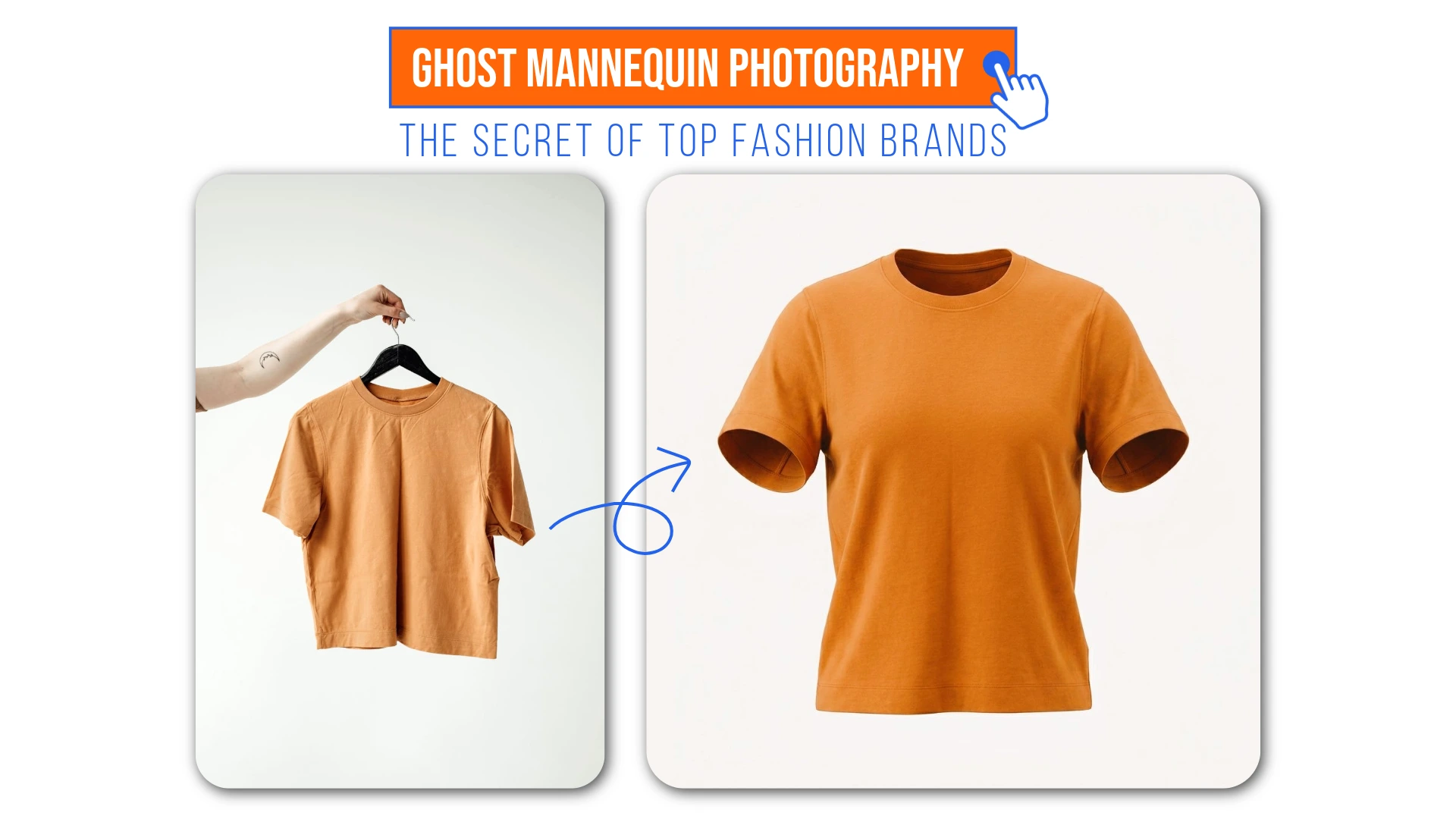
This is where ghost mannequin photography — also called the invisible mannequin effect — comes in. It is one of the most effective techniques in invisible mannequin photography, and AI has made it more accessible than ever before. Whether you are looking for a ghost mannequin photography near me studio or trying to do it yourself, understanding this technique will save you serious time and money.
Traditionally, editors would spend hours on ghost mannequin Photoshop workflows — dressing mannequins, shooting from multiple angles, then masking everything out layer by layer. It was expensive and slow. Now, AI ghost mannequins have completely changed the game. Tools like AfterTaken handle ghost mannequin product photography editing in seconds — delivering that clean, hollow-neck finish that used to be exclusive to big-budget brands.
I have experimented extensively with product photography workflows — building AI pipelines, testing dozens of editing approaches, and working directly on AfterTaken. And in my experience, nothing moves the needle on clothing listings quite like a well-executed ghost mannequin image. It is one of those techniques that looks deceptively simple but makes a dramatic difference to how buyers perceive your product.
Try AfterTaken Ghost Mannequin Effect Generator— Remove mannequins from your product photos instantly and get studio-quality ecommerce images in seconds.
What is Ghost Mannequin Photography?
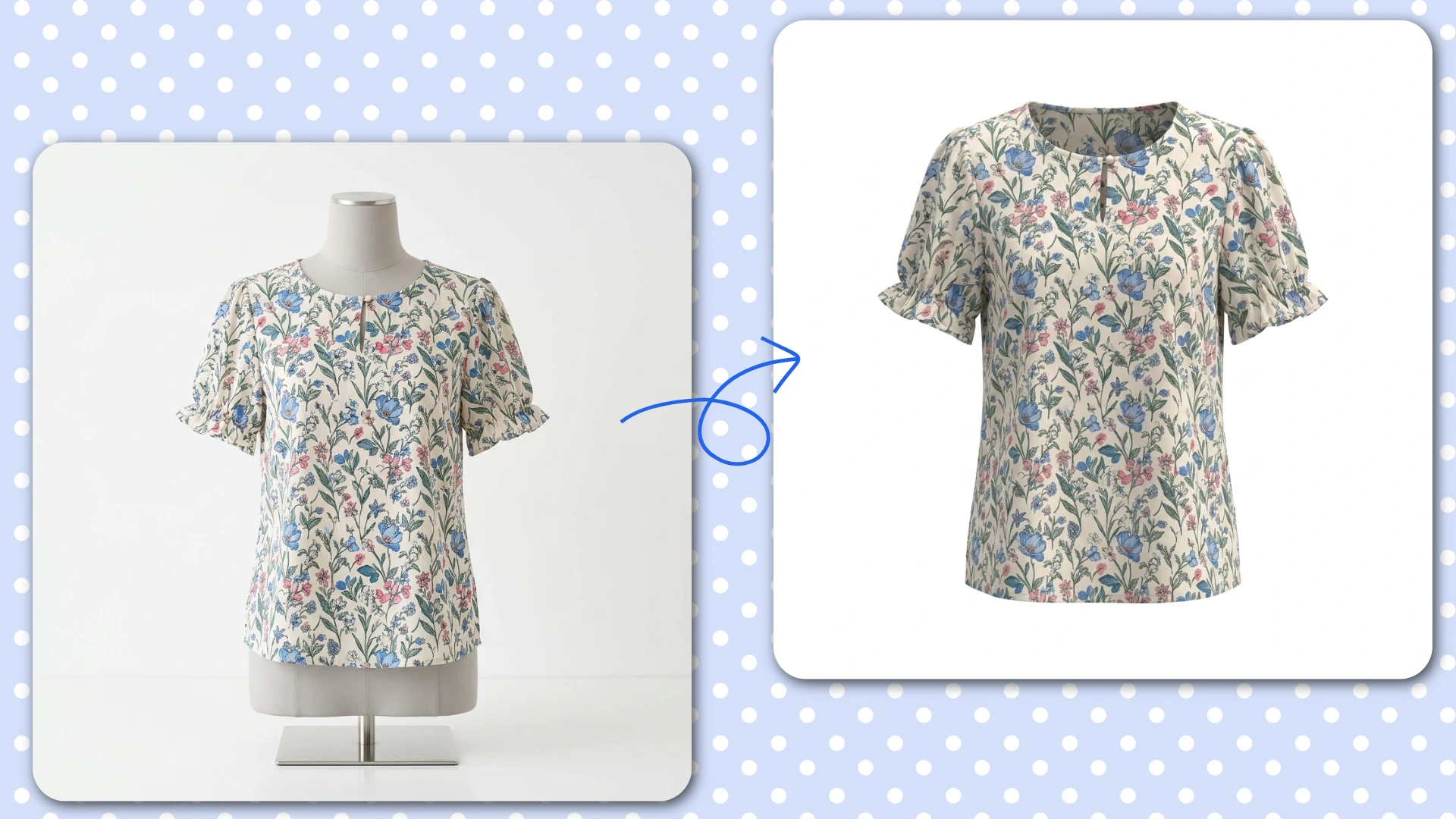
Ghost mannequin photography is a technique where a garment is photographed on a mannequin, and then the mannequin is digitally removed from the image in post-production. The result is a clean, three-dimensional product image that shows the garment’s shape, structure, and fit — as if an invisible person is wearing it.
The effect gives clothing a professional, editorial quality that flat-lay images simply cannot replicate. The garment holds its shape, the neckline sits naturally, the sleeves fall correctly — all the visual cues that help a customer understand how something will actually look and fit when they wear it.
WHY IT MATTERS
E-commerce listings using the ghost mannequin effect consistently see 30 to 40 percent higher conversion rates compared to flat-lay or hanger images. Customers make purchasing decisions faster when they can clearly visualize the fit.
Why the Invisible Mannequin Effect Works So Well
Think about how customers shop for clothing online. They cannot touch the fabric, they cannot try it on, and they cannot ask a store assistant for help. Everything they know about the product comes from the images in the listing.
I have seen this play out firsthand. When we switched product listings from flat-lay to ghost mannequin images during our testing, the difference in engagement was immediate. Buyers spent more time on the listing, asked fewer sizing questions, and — most importantly — added to cart more often. The image was doing the selling that a flat lay simply could not.
A ghost mannequin image solves most of the uncertainty that comes with online clothing shopping:
- It shows the garment’s actual shape and silhouette — not just a folded pile of fabric
- The three-dimensional form helps customers understand the fit at the shoulders, waist, and hem
- It communicates quality — a well-executed hollow mannequin image signals a professional brand
- It creates visual consistency across your entire catalog — every product image has the same clean look
- It works equally well for tops, dresses, jackets, trousers, and even smaller items like socks or gloves
Traditional Ghost Mannequin Editing vs. AI — What Has Changed?
For a long time, creating the ghost mannequin effect was genuinely difficult. Here is what the traditional process looked like:
The Traditional Method
A photographer would take two separate shots of the same garment — one showing the front while it is on the mannequin, and another showing the inner collar, lining, or hem area while the mannequin is partially removed. These two images would then be painstakingly merged in Photoshop.
I tried this workflow myself early on — and honestly, it was painful. Even with a decent understanding of Photoshop, getting the inner collar reconstruction to look natural took far longer than expected. The masking alone on a textured fabric could take 20 minutes per image. For anyone managing a large catalog, this approach simply does not scale.
This process — known as a Neck Joint Service in professional photography — required skilled retouchers, precise masking, careful color matching, and a significant amount of time. A single garment could take 30 to 60 minutes of editing. Scale that across a catalog of 200 products and you are looking at weeks of work and thousands in editing costs.
The AI Method
AI tools like AfterTaken’s Ghost Mannequin tool have compressed that entire process into seconds. The AI automatically identifies the garment, removes the mannequin and background, and reconstructs the hidden areas — the inner collar, the back hem, the sleeve lining — that would have required a second photograph in the traditional workflow.
In my experience building and testing this tool, the part that surprised me most was the collar reconstruction. That is genuinely the hardest part of traditional ghost mannequin editing — getting the inner neckline to look natural and three-dimensional. The AI handles it in a way that would have taken an experienced retoucher 15 to 20 minutes to replicate manually.
Why Switch to an AI Ghost Mannequin Tool?
Beyond the obvious speed advantage, there are several compelling reasons why e-commerce brands are making the switch to AI-powered ghost mannequin photography:
1. Cost Savings at Scale
Professional Neck Joint Service providers charge anywhere from $1 to $5 per image, depending on complexity. For a brand with 500 product SKUs launching a seasonal collection, that is potentially $2,500 in editing costs before a single item has been listed. AI tools like AfterTaken operate on a pay-as-you-go credit model, bringing that cost down dramatically.
2. Catalog Consistency
One of the biggest challenges with traditional ghost mannequin editing is consistency. Different editors have different styles, different tools produce slightly different results, and the look can vary across a large catalog. AI applies the same logic to every image, every time — resulting in a uniform, professional appearance across your entire product range.
3. No Equipment Investment
Professional ghost mannequin photography traditionally required specialized modular mannequins — the kind where parts detach so you can photograph the inner collar area. These can costly. AI eliminates that requirement entirely. You can achieve the hollow mannequin effect from a standard hanger photo or a regular mannequin shot.
4. Faster Time to Market
In fashion and e-commerce, speed matters. A seasonal drop that takes two weeks to photograph and edit can miss its window. AI ghost mannequin tools let brands produce listing-ready images the same day the garments arrive — cutting the entire production cycle dramatically.
How AfterTaken’s AI Ghost Mannequin Tool Works
The process is straightforward enough that anyone on your team can use it — no Photoshop skills, no photography background required. Here is how it works step by step:
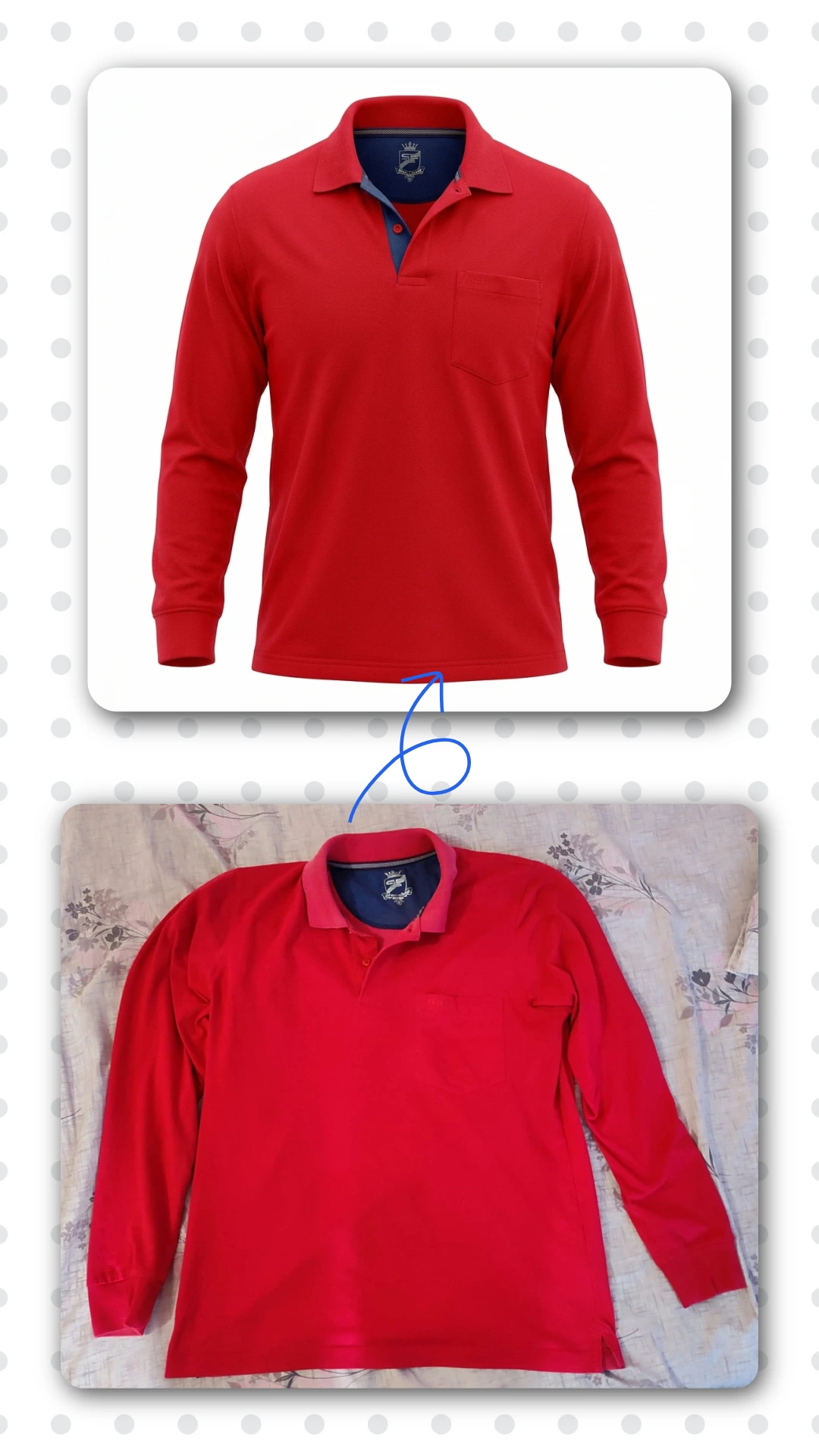
- Upload Your Image: Go to AfterTaken.com/tools/ghost-mannequin and upload your product photo. A clear image of the garment on a mannequin or hanger works well — the AI handles the rest.
- AI Reconstruction: AfterTaken’s AI automatically removes the mannequin and background, then reconstructs the hidden parts of the garment — the inner collar, the back hem, the sleeve lining — that give the image its three-dimensional, hollow mannequin appearance.
- Download: Your finished, ecommerce-ready ghost mannequin image is ready to download at full resolution, suitable for Amazon, Shopify, Myntra, Flipkart, or any other marketplace.
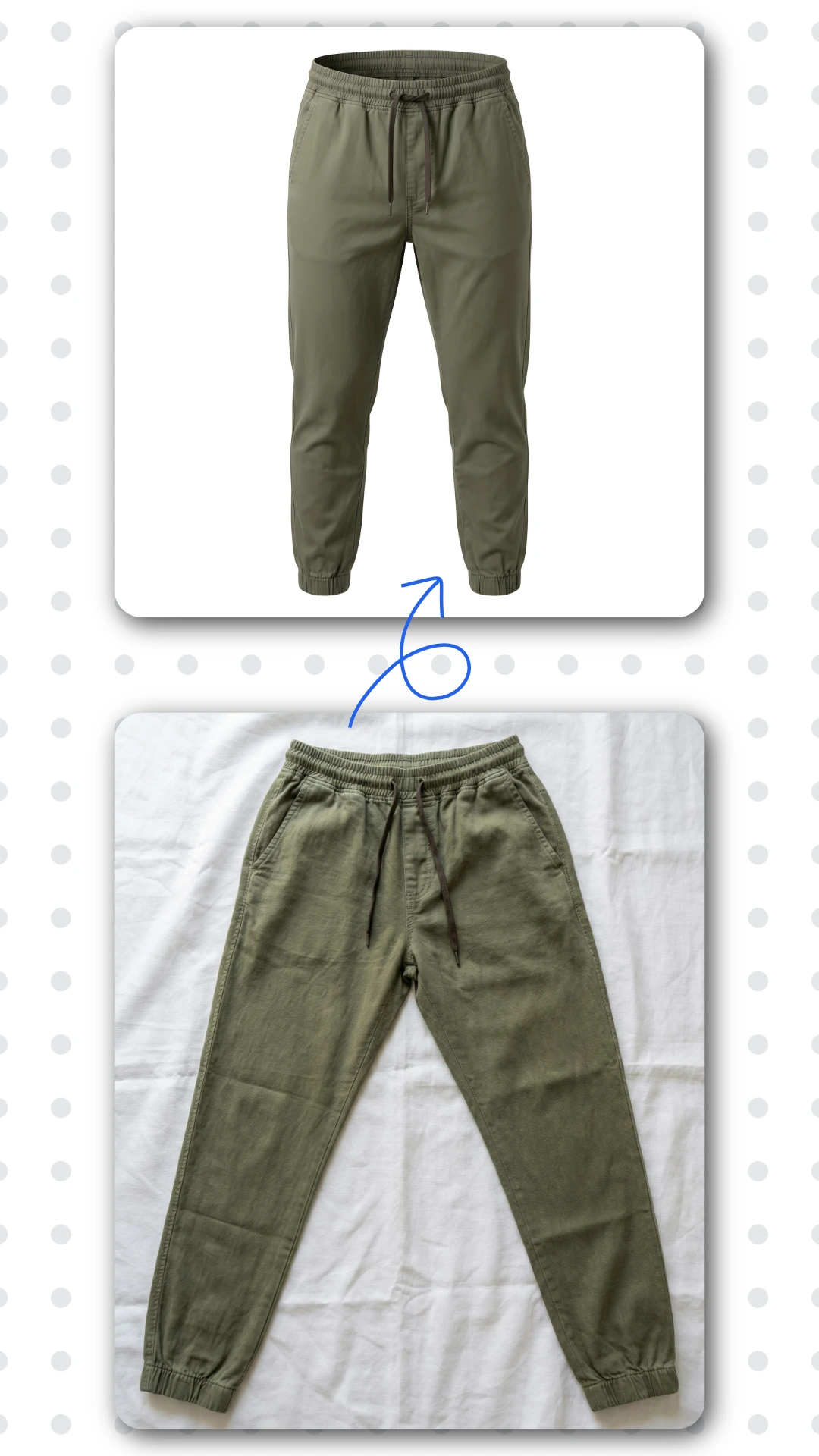
TRY IT FREE
Visit AfterTaken.com/tools/ghost-mannequin and upload your first garment image. Free credits are available on signup — no credit card required to get started.
Pro Tips for Better Ghost Mannequin Results
AI does the heavy lifting, but the quality of your source image still matters. Through a lot of trial and error — and testing hundreds of garment images while building AfterTaken — I have figured out what makes the biggest difference. Here are the tips I keep coming back to:
Focus on Symmetry
When placing the garment on a mannequin, take a moment to make sure it is fitted evenly. If one shoulder is higher than the other or the collar is off-center, the AI will faithfully reproduce that imperfection. A few seconds of adjustment before the shot saves editing time later.
In my experience, this is the single most common mistake people make. They rush the setup, assuming the AI will fix it — and then wonder why the result looks slightly off. Symmetry at the source saves you a second round of editing.
Use Soft, Even Lighting
Harsh directional lighting creates strong shadows that can confuse AI reconstruction algorithms. Soft, even lighting — either a lightbox, diffused natural light, or a two-light studio setup — captures fabric texture clearly and gives the AI clean detail to work with. The better the lighting, the more realistic the final hollow mannequin effect will look.
From my own testing, a simple two-light setup with diffusers on both sides consistently produced the best AI results — even better than a professional studio with a single key light. Even lighting removes guesswork for the AI.
Shoot at High Resolution
The AI can only work with the information in your original image. A blurry or low-resolution photo will produce a blurry or low-resolution result. Shoot at the highest resolution your camera or smartphone supports — most modern smartphones are more than adequate for e-commerce product photography.
Keep the Background Simple
A plain, light-colored background — white, grey, or cream — makes it easier for the AI to identify the garment edges accurately. Busy or patterned backgrounds can sometimes create edge detection errors that reduce the quality of the final image.
Who Should Be Using Ghost Mannequin Photography?
If your business sells clothing or accessories online, the ghost mannequin effect is worth considering. Here are the specific categories where it makes the most impact:
- Fashion and apparel brands —
- Lingerie and swimwear brands —
- Sportswear and activewear —
- Children’s clothing brands —
- Accessories —
- Private label sellers on Amazon and Flipkart —
Ghost Mannequin Photography and the 3D Product Image Effect
The terms ghost mannequin photography, invisible mannequin effect, and 3D product image generator are often used interchangeably — and they all describe the same core idea: creating a product image that shows shape, depth, and structure without a visible mannequin or model.
AI has brought all three of these concepts together into a single, accessible workflow. What previously required a photographer, a retoucher, specialized equipment, and multiple days can now be accomplished by uploading a photo and clicking a button.
For e-commerce sellers who are serious about their product presentation, this is genuinely one of the most impactful tools available right now.
Final Thoughts
Ghost mannequin photography is no longer a luxury reserved for big fashion brands with professional studios and retouching teams. AI has democratized the invisible mannequin effect, making it accessible to any seller — regardless of budget, team size, or technical skill.
Speaking from my own experience — both as someone who has spent a significant amount of time in AI image workflows and as someone who built a tool specifically for this problem — the ghost mannequin effect is one of the highest-ROI improvements any clothing seller can make to their product listings. The effort is minimal. The impact on how your product is perceived is significant.
If you are still using flat-lay photos or standard mannequin images for your clothing listings, you are leaving conversions on the table. The difference in how a ghost mannequin image presents a garment compared to a flat-lay is significant — and customers notice.
The good news is that getting started has never been easier or more affordable. Upload your first garment photo today and see the difference for yourself.
Related Articles & Next Steps
I believe that this post should give you a better idea of ghost mannequin photography. If you’d like, you can read the articles below to gain better knowledge of AI product photography, best AI tools for your e-commerce business etc.:
- [AfterTaken AI Review] – Generate professional product photos, product listing copy, color corrections products etc. in minutes for your e-commerce store.
- [Clothing and accessories Product Color Change AI] – Change your product color instantly with just few easy steps.
- [Best Avatar AI Video Generators] – Know about best Avatar AI Video Generators for your requirements.
Frequently Asked Questions (FAQs)
AI has made professional-quality fashion photography accessible to brands of all sizes. Earlier, getting a clean ghost mannequin effect required expensive studio shoots and hours of Photoshop editing. Now, AI tools like AfterTaken can process the same result in seconds — making high-converting product images affordable even for small sellers on Amazon, Myntra, or Shopify.
Absolutely. Ghost mannequin photography gives your clothing a 3D, wear-ready look without hiring models or spending on elaborate shoots. It is one of the few techniques that directly impacts how buyers perceive fit and quality — which is why top fashion brands have been using it for years.
Three things matter most — consistent lighting, shooting from multiple angles (front, back, and inner collar), and clean post-processing. For clothing specifically, the ghost mannequin or invisible mannequin effect is the single biggest upgrade you can make to your product listings.
Yes — and AI has made this easier than ever. You no longer need a full studio setup or a retouching team. With the right AI ghost mannequin tool, even a basic home shoot can produce results that look completely professional and retail-ready.
Each has its place, but for ecommerce conversions, ghost mannequin photography consistently outperforms the others. Flat-lays lack dimension, model shoots are costly, and ghost mannequin strikes the perfect balance — showing garment fit, structure, and detail at a fraction of the cost.

Pingback: Free AI Photo Color Correction Tool: Fix Product Images Instantly
Pingback: Best 5 AI Ghost Mannequin Photography Tools (2026)