

Have you ever taken a photo that looked dull, too dark, or simply lacked the colors you expected? That’s where color grading comes in.
Color grading helps improve the mood, colors, brightness, and overall look of an image. The good news is that you no longer need expensive software like Photoshop or Lightroom to achieve professional-looking results.
In this article, we’ll look at the best free color grading tools for photos that you can use directly in your browser. These tools are beginner-friendly, fast, and require no advanced editing skills.
1. AfterTaken AI Photo Color Correction (Best Overall)
If you’re looking for the easiest way to improve photo colors without spending hours editing, AfterTaken is one of the best options available.
Unlike many online editors that only provide basic brightness and saturation controls, AfterTaken combines multiple color correction methods into a single tool. It offers AI-powered color enhancement, manual adjustment sliders, RGB curve controls, and Lift, Gamma and Gain support for more advanced grading.
Why It Stands Out
- One-click AI color correction
- Professional color grading controls
- RGB curve adjustments
- Lift, Gamma and Gain support for cinematic looks
- Beginner-friendly interface
- No software installation required
- Free to use online
Whether you’re editing portraits, product photos, travel images, or social media content, AfterTaken provides a good balance between simplicity and professional control.
Best For
- Content creators
- Bloggers
- Social media users
- Product photographers
- Beginners who want professional-looking results quickly
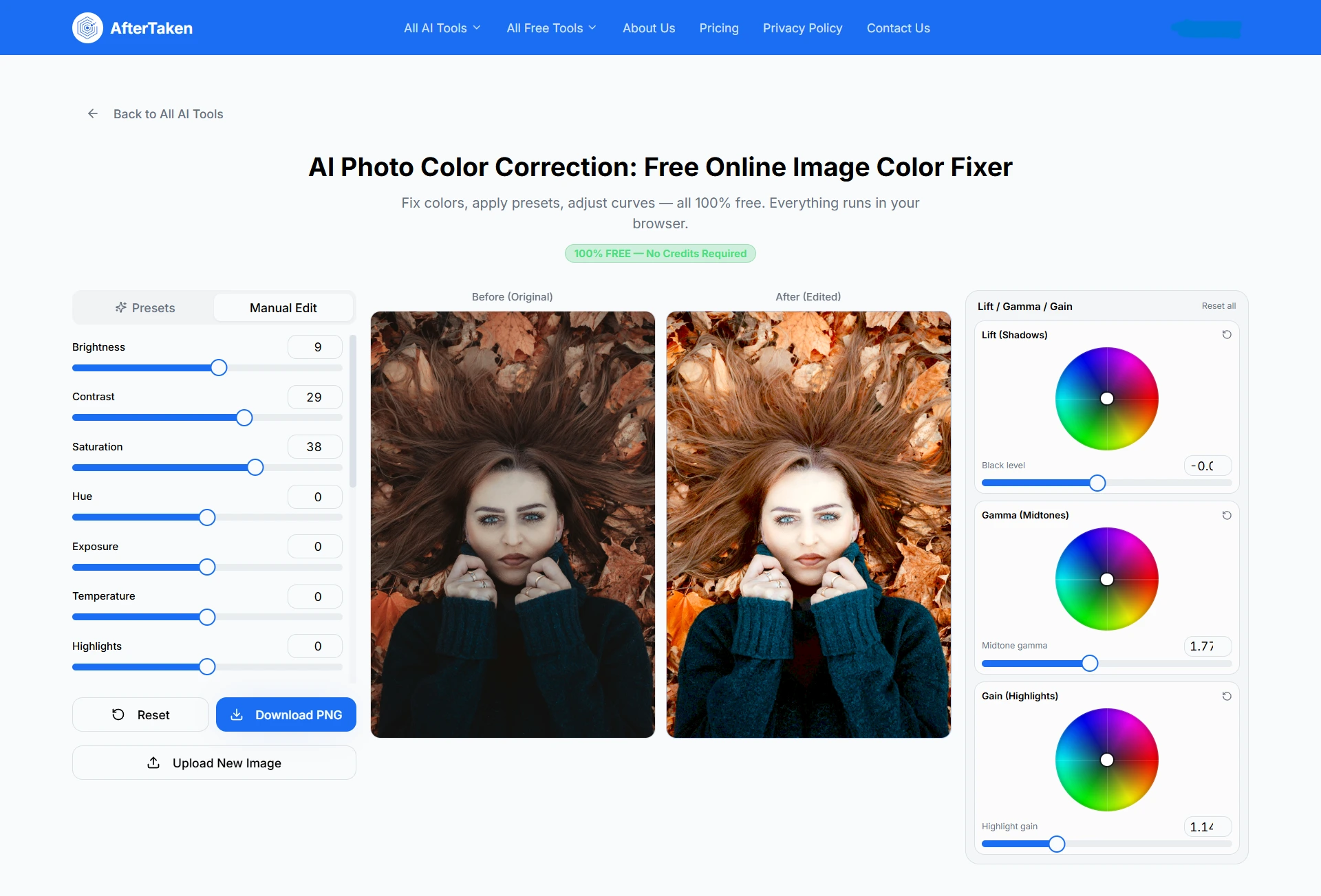
In my opinion, If you are looking just like a full control over color corrections in photos the you should definitely check AfterTaken’s AI Photo Color Correction because this is 100% free browser based online photo color grading tool and very fast process without lagging your system.
2. Pixlr
Pixlr has been a popular online photo editor for years and includes several useful color correction tools. Its color adjustment features allow users to improve brightness, exposure, vibrance, saturation, temperature, and tint. Pixlr also offers automatic color fixes that can improve photos with a single click.
Pros
- Free online editor
- Automatic color correction tools
- Easy-to-use interface
- Supports multiple image formats
Cons
- Some advanced features require a premium plan
- Less specialized for color grading compared to dedicated tools
Best For Users who want a complete online photo editor along with color correction features.
3. Fotor
Fotor is another beginner-friendly online photo editor that includes AI-powered color correction features. The platform can automatically adjust lighting, contrast, saturation, and overall color balance to improve photo quality. It also offers additional enhancement tools for portraits and social media images.
Pros
- AI-powered enhancements
- Simple workflow
- Good for quick edits
- Works on desktop and mobile
Cons
- Some premium limitations
- Less control for advanced color grading
Best For Casual users who want fast and automatic photo improvements.
Comparison Table
| Feature | AfterTaken | Pixlr | Fotor |
| Free Online Access | Yes | Yes | Yes |
| AI Color Correction | Yes | Yes | Yes |
| Manual Color Controls | Yes | Yes | Yes |
| RGB Curves | Yes | Limited | Limited |
| Lift, Gamma & Gain Support | Yes | No | No |
| Beginner Friendly | Yes | Yes | Yes |
| Advanced Grading | Yes | Moderate | Moderate |
Which Free Color Grading Tool Should You Choose?
The right tool depends on your needs.
- If you want the best combination of AI automation and professional color grading controls, AfterTaken is the strongest option.
- If you need a full online photo editor with color correction tools, Pixlr is a solid choice.
- If you prefer quick AI enhancements with minimal effort, Fotor works well.
For most users, especially beginners and content creators, AfterTaken offers the most complete free color grading experience because it combines one-click AI improvements with advanced editing controls in a single tool.
Final Thoughts
One thing, I want to say that If you want fast paced photo color grading with professional touch then you should not use heavy photo editing software. Use always online Image color grading tool to save your time and effort.
Among all free online options available today, AfterTaken stands out as the best overall choice thanks to its combination of AI-powered corrections, professional-grade controls, and easy-to-use interface. If you’re looking for a free color grading tool that works directly in your browser, it’s a great place to start.
Frequently Asked Questions (FAQs)
Color correction focuses on fixing issues like exposure, white balance, brightness, and color casts so a photo looks natural. Color grading goes a step further by giving the image a specific style, mood, or cinematic look.
Yes. Many online tools allow you to color grade photos without downloading any software. Tools like AfterTaken, Pixlr, and Fotor provide free color enhancement and grading features directly in your browser.
Not at all. Modern AI-powered tools can automatically improve colors, contrast, and lighting with just one click. Beginners can achieve impressive results without learning complex editing techniques.
If you want a simple workflow with both AI-powered corrections and manual controls, AfterTaken is a great choice. It helps beginners improve photos quickly while still offering advanced tools when needed.
Color grading doesn’t increase the actual resolution of a photo, but it can dramatically improve how the image looks. Better colors, contrast, and tonal balance often make photos appear more professional and visually appealing.
Yes. AI color grading tools analyze your image and automatically adjust elements like brightness, contrast, saturation, and white balance to create a more balanced and attractive result.
For quick edits and everyday use, online color grading tools are often faster and easier. Photoshop offers more advanced editing capabilities, but many users don’t need that level of complexity for basic photo enhancement.
Almost any photo can benefit from color grading, including portraits, landscapes, travel photos, product images, social media content, and old photos that need a fresh, vibrant look.
In many cases, yes. Proper color grading can restore vibrancy, improve contrast, and make faded images look more lively and engaging. AI-powered tools are especially effective at enhancing dull photos automatically.
AfterTaken combines AI color correction, manual adjustments, RGB curves, and Lift, Gamma & Gain color wheels support in a single browser-based tool. This makes it suitable for both beginners looking for one-click improvements and creators who want more control over their final look.