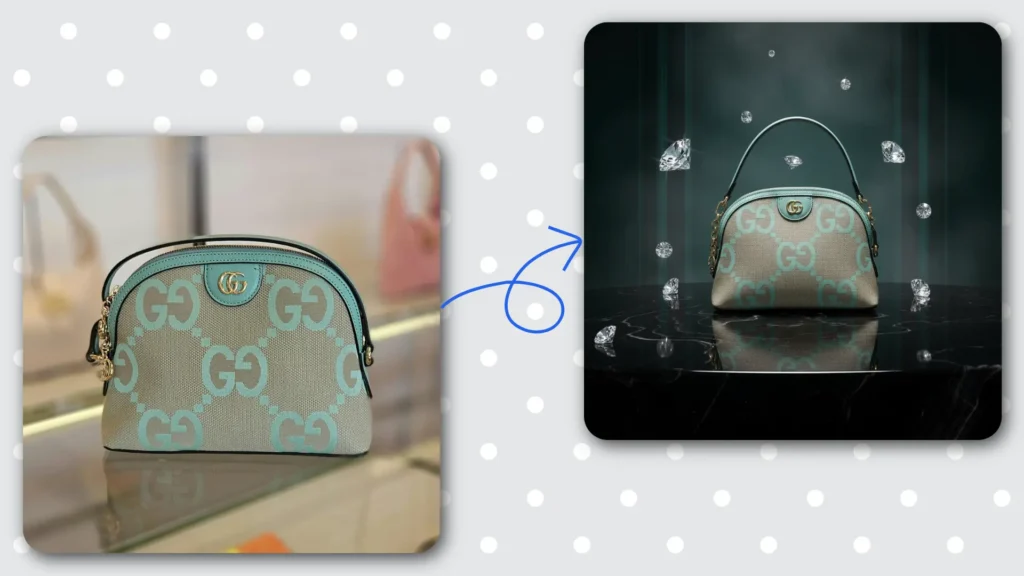

If you have been searching for AI for product photography or wondering whether an AI tool for product photography can actually replace a professional studio — you are not alone. It is one of the fastest-growing searches in the AI space right now, and for good reason.
E-commerce is more visual than ever. A customer can’t touch, smell, or try your product before buying — your photos are doing all the selling. But professional product photography is expensive, slow, and not always accessible, especially for small business owners and solo sellers.
That’s where AI comes in. In this guide, we’ll explain exactly what AI for product photography is, how it works, who should use it, and which tools are worth your time in 2026.
What is AI for Product Photography?
AI for product photography refers to the use of artificial intelligence to generate, enhance, or transform product images — without the need for a physical studio, professional lighting, or a photographer.
At its core, these tools use advanced image generation and editing models to:
- Remove or replace product backgrounds automatically
- Place products into realistic lifestyle scenes and environments
- Enhance image quality, lighting, and shadows
- Generate entirely new backgrounds from text prompts
- Create multiple visual variations of the same product quickly
The result? Studio-quality product images that used to cost thousands of rupees — now generated in seconds.
How Does AI Product Photography Work?
Most AI product photography tools follow a simple workflow:
Step 1 — Upload Your Product Photo
You start with a basic photo of your product — even a smartphone photo works. The AI uses this as the base.
Step 2 — Background Removal
The AI automatically detects and removes the background, isolating just your product. This process that used to take 20–30 minutes in Photoshop now happens in seconds.
Step 3 — Scene or Background Generation
You either choose from pre-made scene templates (kitchen, outdoor, luxury studio, etc.) or type a text prompt describing the background you want. The AI places your product into that environment with realistic lighting and shadows.
Step 4 — Download and Use
Your final image is ready to download and use directly on your Shopify store, Amazon listing, Instagram, or anywhere else.
REAL EXAMPLE
A seller uploads a plain photo of a perfume bottle. The AI removes the white background, places the bottle on a marble surface with soft studio lighting, adds subtle reflections — and in 30 seconds, the image looks like it was shot in a ₹50,000/day studio.
Traditional Product Photography vs AI Product Photography
Let’s be honest — how does AI actually compare to hiring a photographer?
Traditional Photography
- Cost: ₹5,000 – ₹50,000+ per shoot
- Time: Days to weeks including editing
- Flexibility: Limited — reshoots are expensive
- Consistency: Varies by photographer
- Scalability: Hard to scale for large catalogs
AI Product Photography
- Cost: Free to a few hundred rupees per month
- Time: Seconds to minutes per image
- Flexibility: Unlimited variations anytime
- Consistency: Same quality every time
- Scalability: Hundreds of images in minutes
For most e-commerce sellers — especially those just starting out or managing large catalogs — AI product photography wins on almost every dimension.
Who Should Use AI for Product Photography?
AI product photography tools are not just for big brands with tech teams. They’re built for:
- E-commerce sellers on Amazon, Flipkart, Meesho, or Shopify who need quality images fast
- D2C brand owners who want consistent, on-brand visuals across all channels
- Freelance photographers who want to speed up their workflow and offer more to clients
- Small business owners who can’t afford studio shoots for every product
- Social media managers who need fresh product visuals regularly for posts and ads
DID YOU KNOW?
Products with high-quality images see up to 40% higher conversion rates compared to products with plain white background photos. Your product image is your first — and sometimes only — chance to make a sale.
The Best AI Tools for Product Photography So Far
The market has several options — here’s an honest look at the most notable ones:
1. AfterTaken AI — Best Overall for eCommerce Sellers
AfterTaken AI is a purpose-built AI product photography tool designed specifically for online sellers. It offers 50+ scene templates, automatic background removal, and uses Google’s Gemini model for image generation — giving you studio-quality results without any design skills.
- Best for: eCommerce sellers, Shopify stores, D2C brands
- Key feature: 50+ ready-made scene templates + custom prompt support
- Pricing: Pay-as-you-go — no monthly subscription lock-in
- Free plan: Yes — free credits available to get started
TRY IT FREE
Visit AfterTaken.com and transform your first product photo in under 60 seconds. No design skills needed.
2. Photoroom — Popular Background Remover
Photoroom is one of the most widely used AI photo editing apps, particularly popular for quick background removal. It works well for basic edits but has limited scene generation capabilities compared to more specialized tools.
- Best for: Quick background removal, basic edits
- Limitation: Fewer creative scene options, less suited for advanced product staging
3. Midjourney — For Creative, Artistic Shots
Midjourney is a powerful text-to-image AI that can generate stunning visuals from prompts. However, it’s not specifically built for product photography — placing your actual product into an AI-generated scene requires extra steps and technical knowledge.
- Best for: Creative, artistic product concepts
- Limitation: Not plug-and-play for product photos — requires prompt engineering skills
Is AI Product Photography Free?
This is one of the most common questions — and the answer is: it depends.
Most AI product photography tools offer a free tier or free credits to get started. AfterTaken AI, for example, gives you free credits when you sign up — so you can generate and download professional product images at zero cost to start.
Paid plans typically unlock:
- More image generations per month
- Higher resolution downloads
- Access to premium scene templates
- Priority processing and advanced features
For most small sellers and beginners, the free tier is more than enough to get started and see real results before committing to a paid plan.
How to Get Started with AI Product Photography
Getting your first AI-generated product image takes less than 2 minutes. Here’s how:
- Go to AfterTaken.com and create a free account
- Upload a photo of your product — even a smartphone photo works
- Choose a scene template or type a custom background prompt
- Let the AI generate your professional product image in seconds
- Download and use directly on your store, social media, or ads
Final Thoughts
AI for product photography is no longer a futuristic concept — it’s a practical, affordable tool that thousands of e-commerce sellers are using right now to compete with bigger brands.
Whether you’re selling on Amazon, running a Shopify store, or building a D2C brand, professional product images are non-negotiable. AI tools like AfterTaken AI make it possible to get those images without a studio, a photographer, or a big budget.
Ready to see the difference? Try AfterTaken AI free at AfterTaken.com and transform your first product photo today.


Pingback: AfterTaken AI Review: The Best AI Product Photography